
ReconcileX Agent™
A product by EvolveX Technologies
Bank statements, ledgers and intercompany accounts matched automatically, exceptions explained, and journal entries drafted for review.

ReconcileX Agent™ is a reconciliation automation product from EvolveX Technologies. It imports bank statements, payment-gateway reports, sub-ledgers and intercompany balances, matches transactions against your general ledger using rules and machine learning, explains every unmatched item and drafts the correcting journal entries for a person to approve. Reconciliations that took days at month end run daily, with the exceptions already sorted.
Why We Built ReconcileX Agent
Reconciliation is where finance teams lose their month end: exporting statements, matching thousands of lines in spreadsheets, hunting for the one bank fee or partial payment that breaks the balance, then keying the adjustments. We built matching engines for accounting firms and shared-service centres that needed to reconcile many entities and many banks the same way every month. ReconcileX Agent is that engine packaged as a product, with the same human-review workspace as our other finance agents.
What ReconcileX Agent Does
- Any source, any format. Bank statements (PDF, CSV, MT940, CAMT), payment-gateway and marketplace reports, card settlements, sub-ledgers and intercompany balances imported automatically.
- Rule-based and AI matching. One-to-one, one-to-many and many-to-many matches across amount, date, reference and counterparty, with tolerances for fees, FX and timing; the models learn from your past matches.
- Exception explanation. Every unmatched item is categorised (timing, bank charge, partial payment, duplicate, missing invoice) with a suggested resolution.
- Journal entry drafting. Correcting and accrual entries drafted with GL codes and narratives, queued for approval, then posted to the ERP.
- Multi-entity and intercompany. Reconcile many entities, currencies and banks in one run; intercompany balances agreed automatically with differences flagged.
- Close dashboard and audit trail. Live status of every reconciliation, ageing of open items and a complete record of who matched or approved what.
How ReconcileX Agent Works
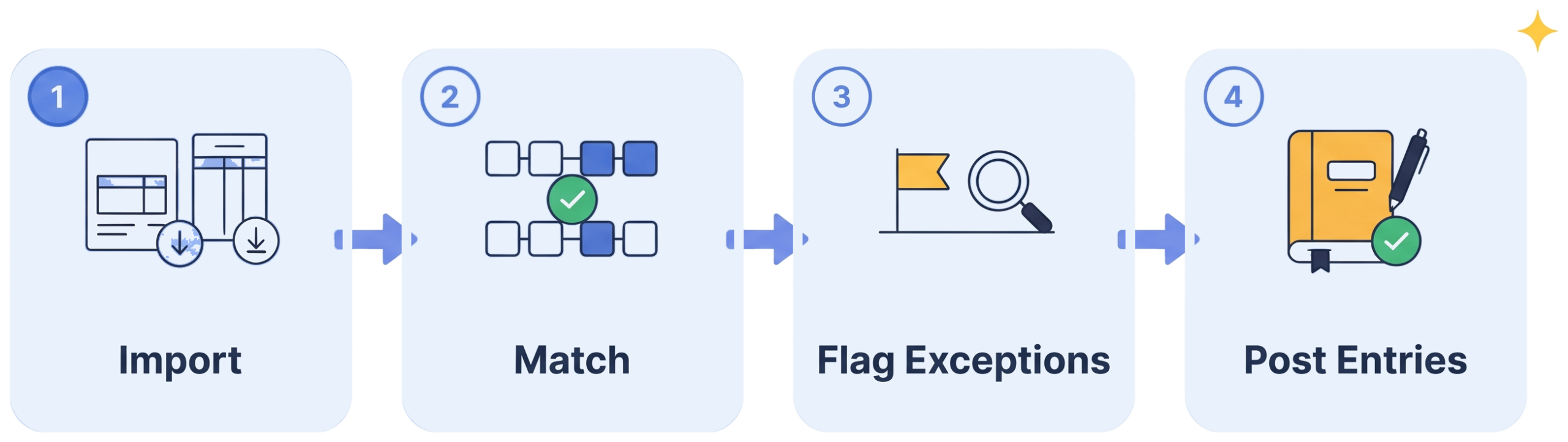
Import. Statements, reports and ledgers are collected from banks, gateways and the ERP on a schedule.
Match. Transactions are matched by rules and learned patterns, including split and grouped payments.
Flag exceptions. Unmatched items are categorised and explained, with the likely fix suggested.
Post entries. Approved journal entries are posted to the ERP and the reconciliation is signed off, with a full audit trail.
Who ReconcileX Agent Is Built For
- Finance teams reconciling multiple bank accounts, gateways or marketplaces every month.
- Accounting firms and shared-service centres running reconciliations for many entities and clients.
- Groups with intercompany balances who need entities to agree before consolidation.
Works With the Systems You Already Run
SAP, Oracle NetSuite, Microsoft Dynamics 365, QuickBooks, Xero, Tally, Zoho Books and Odoo for ledgers and journal posting; bank feeds and statement formats (MT940, CAMT.053, BAI2, CSV, PDF); Stripe, Razorpay, PayPal, Amazon and Shopify settlement reports. Where a system has no API, an RPA bot posts entries through its screens.
What You Get With ReconcileX Agent
- Pre-built product. Extraction models, rules, workflows and connectors that already work, configured to your documents and systems rather than built from scratch.
- Pilot on your own data. You see results on your real files before committing to a rollout.
- Deployment and integration. Set up in your cloud environment or one we manage, connected to your systems by our team.
- Training and handover. Your team learns the review workspace and exception handling in a few sessions.
- Support and improvement. Monitoring, maintenance and model updates as your documents, systems and volumes change, under an agreed support plan.
- Security by default. ISO 27001:2022-certified delivery, encrypted credential storage, full audit logging, NDAs and data processing agreements as standard.
Results You Can Expect
- Daily reconciliations instead of a month-end scramble
- Exceptions already categorised when your team opens the file
- Fewer errors from manual matching and re-keying
- Faster, more predictable closes with a live status view
- Audit evidence produced as a by-product, not a separate task
Read our financial reporting automation case study.
ReconcileX Agent FAQs
What can ReconcileX Agent reconcile?
Bank to ledger, payment gateway and marketplace settlements to sales, card settlements, supplier statements to accounts payable, sub-ledger to general ledger, and intercompany balances between entities.
How does it handle partial payments, bank fees and FX differences?
Matching rules include tolerances and split logic, so a payment net of fees or a customer paying two invoices at once is matched and the difference is explained and drafted as a journal entry rather than left as an unmatched line.
Does it post to our ledger automatically?
Only after approval. Draft entries are queued in the review workspace; an approver checks and posts them, and every posting is logged. Fully automatic posting can be enabled for low-risk categories if you choose.
Which accounting systems and banks does it work with?
Any system with an API or import format, including SAP, NetSuite, Dynamics 365, QuickBooks, Xero, Tally, Zoho Books and Odoo, and all standard bank statement formats. For systems without an API, an RPA bot posts entries through the existing user interface.
How do we get started?
Send us last month’s statements and ledger export for one bank account. We run a pilot, show you the match rate and the exception list on your own data, then connect ReconcileX Agent to your accounting system. Request a demo or book a call from the button in the header.
See ReconcileX Agent on Your Own Documents
Send us a sample batch and we will show you what ReconcileX Agent extracts, checks and posts on your real files, then scope a pilot. No slide decks, no generic demo data.