
ExpenseX Agent™
A product by EvolveX Technologies
Receipts and expense claims captured from a phone photo, checked against policy, approved and reimbursed, without anyone retyping a line.

ExpenseX Agent™ is an expense management automation product from EvolveX Technologies. It captures receipts and expense claims from phone photos, email and card feeds, extracts merchant, date, amount, tax and category, checks each line against your expense policy, routes approvals and posts the result to payroll, accounting or your ERP. It runs on the same extraction engine as InvoiceX Agent, tuned for the messy, small, high-volume documents that expenses produce.
Why We Built ExpenseX Agent
Every client that automated invoices with us asked the same follow-up question: can it do expenses too? Expense claims are the other half of accounts payable, and they are worse: crumpled receipts, phone photos taken in a taxi, foreign currencies, per-diem rules, duplicate submissions and a finance team chasing managers for approvals at month end. ExpenseX Agent packages the receipt-reading models, policy rules and approval workflows we built for those clients into one product.
What ExpenseX Agent Does
- Receipt capture anywhere. Phone photos, email forwards, PDF statements and corporate-card feeds; receipts matched to card transactions automatically.
- AI receipt extraction. Merchant, date, amount, tax, currency and category extracted from thermal receipts, hotel folios and foreign-language invoices, with confidence scores.
- Policy checks. Per-category limits, per-diem rates, receipt-required thresholds, duplicate and weekend spend flagged before a manager sees the claim.
- Approval routing. Claims routed by amount, cost centre or project with reminders and escalation, so nothing waits in an inbox at month end.
- Posting and reimbursement. Approved claims posted to payroll, accounting or ERP with GL codes and tax split; reimbursement files generated for your bank.
- Audit-ready records. Every claim stored with the receipt image, extracted values, policy result and approver, ready for auditors and tax authorities.
How ExpenseX Agent Works
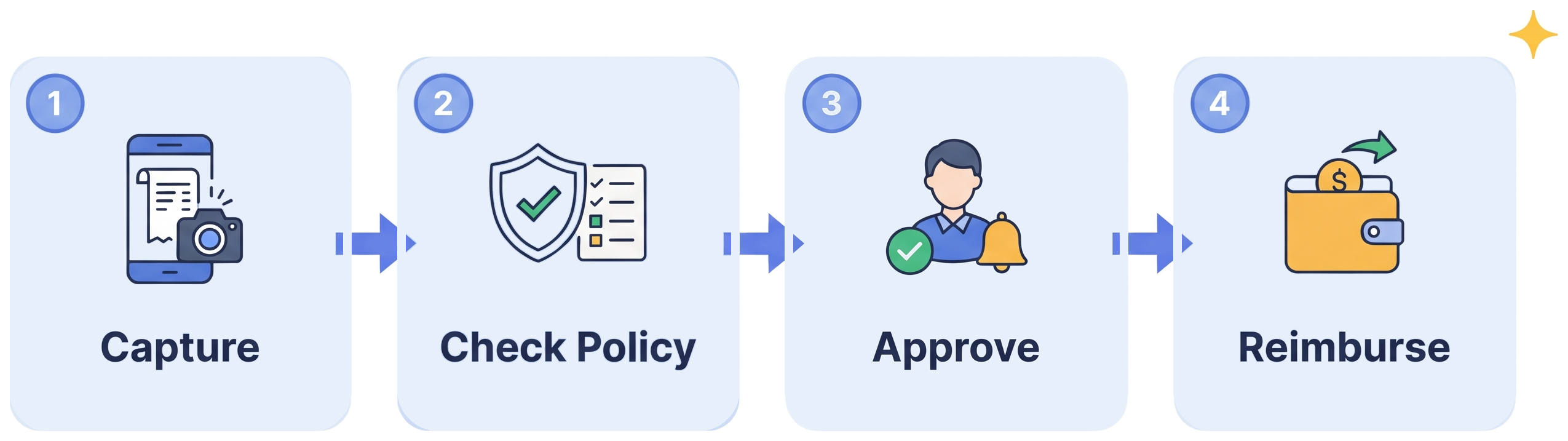
Capture. The employee photographs the receipt or forwards the email; card transactions arrive from the bank feed.
Check policy. Extracted values are checked against limits, per-diems, categories and duplicates; problems are explained to the claimant.
Approve. The right manager is notified with the receipt and the policy result side by side; one tap to approve.
Reimburse. Approved claims are posted to payroll or ERP and a reimbursement file goes to your bank, with a full audit trail.
Who ExpenseX Agent Is Built For
- Finance and HR teams in companies with travelling staff, field teams or distributed offices.
- Accounting firms and shared-service centres processing expenses for multiple entities.
- Businesses already using InvoiceX Agent, who want one workflow for supplier invoices and employee expenses.
Works With the Systems You Already Run
Posts to SAP, Oracle NetSuite, Microsoft Dynamics 365, QuickBooks, Xero, Tally and Zoho Books; payroll systems such as ADP, Keka and GreytHR; corporate-card feeds from major banks. Where a system has no API, an RPA bot enters the claim through its screens.
What You Get With ExpenseX Agent
- Pre-built product. Extraction models, rules, workflows and connectors that already work, configured to your documents and systems rather than built from scratch.
- Pilot on your own data. You see results on your real files before committing to a rollout.
- Deployment and integration. Set up in your cloud environment or one we manage, connected to your systems by our team.
- Training and handover. Your team learns the review workspace and exception handling in a few sessions.
- Support and improvement. Monitoring, maintenance and model updates as your documents, systems and volumes change, under an agreed support plan.
- Security by default. ISO 27001:2022-certified delivery, encrypted credential storage, full audit logging, NDAs and data processing agreements as standard.
Results You Can Expect
- Claims submitted in seconds from a phone, not a spreadsheet at month end
- Policy breaches and duplicates caught before approval, not after payment
- Managers approve from one notification instead of an inbox thread
- Faster reimbursement, which employees notice and finance teams get credit for
- A complete, searchable audit trail for every claim
See related finance-automation results in our case studies.
ExpenseX Agent FAQs
How is ExpenseX Agent different from an expense app?
Expense apps give employees a form to fill in. ExpenseX Agent reads the receipt, fills the claim, checks it against your policy and posts it to your systems, and EvolveX Technologies configures and supports it for you. You get a working process, not another app to administer.
Can it read thermal receipts, hotel folios and foreign invoices?
Yes. The models are trained on real receipts: faded thermal paper, phone photos at an angle, multi-page hotel folios and foreign-currency invoices with automatic conversion. Low-confidence fields go to the claimant or a reviewer rather than through unchecked.
Does it enforce our expense policy?
Yes. Per-category limits, per-diem rates, receipt thresholds, approved merchant lists and duplicate detection are configured to your policy during the pilot, and the claimant sees why a line was flagged.
Which payroll and accounting systems does it post to?
Any system with an API or import format, including SAP, NetSuite, Dynamics 365, QuickBooks, Xero, Tally, Zoho Books and common payroll platforms. For systems without an API, an RPA bot posts the claim through the existing user interface.
How do we get started?
Send us a sample batch of receipts and your expense policy. We run a pilot, show you the extraction and policy results on your own claims, then connect ExpenseX Agent to your payroll or accounting system. Request a demo or book a call from the button in the header.
See ExpenseX Agent on Your Own Documents
Send us a sample batch and we will show you what ExpenseX Agent extracts, checks and posts on your real files, then scope a pilot. No slide decks, no generic demo data.